Why Your GPU Cluster Is 80% Idle (and How to Fix)

Debo Ray
Co-Founder, CEO

This is a 5 part series on why GPU clusters are under-utilized, how to measure utilization and how to improve it.
Part 1 - Why is your GPU cluster idle
Part 2 - How to measure your GPU utilization
Part 3 - How to fix your GPU utilization
Part 4 - GPU security and Isolation
Part 5 - Tips for optimizing GPU utilization in Kubernetes
Why is your GPU cluster idle#
While organizations obsess over CPU and memory optimization in their Kubernetes clusters, a far more expensive problem is quietly destroying budgets: GPU underutilization. The average GPU-enabled Kubernetes cluster runs at 15-25% utilization, but unlike CPU overprovisioning, which can waste thousands of dollars per month, GPU underutilization can burn through tens or hundreds of thousands.
Consider this: a single NVIDIA H100 instance costs $30-50 per hour across major cloud providers. An underutilized cluster with 20 GPUs running at 20% utilization incurs approximately $200,000 in annual compute costs alone. Yet most organizations lack the monitoring, processes, and architectural strategies to address this systematic waste.
The challenge isn't just about resource efficiency—it's about the fundamental economics of AI/ML infrastructure. GPU resources are 10-50x more expensive than traditional compute, making optimization not just beneficial but business-critical. This post examines how various ML workload types lead to overprovisioning, strategies for monitoring actual GPU utilization, and architectural approaches that can significantly enhance ROI.
Understanding GPU Workload Patterns: The Foundation of Optimization#

Since cloud compute is billed by the hour (vCPU cores/hr, GB RAM/hr, GPU/hr, ..), optimizing an overprovisioned workload can have a massive impact on the monthly cloud invoice.
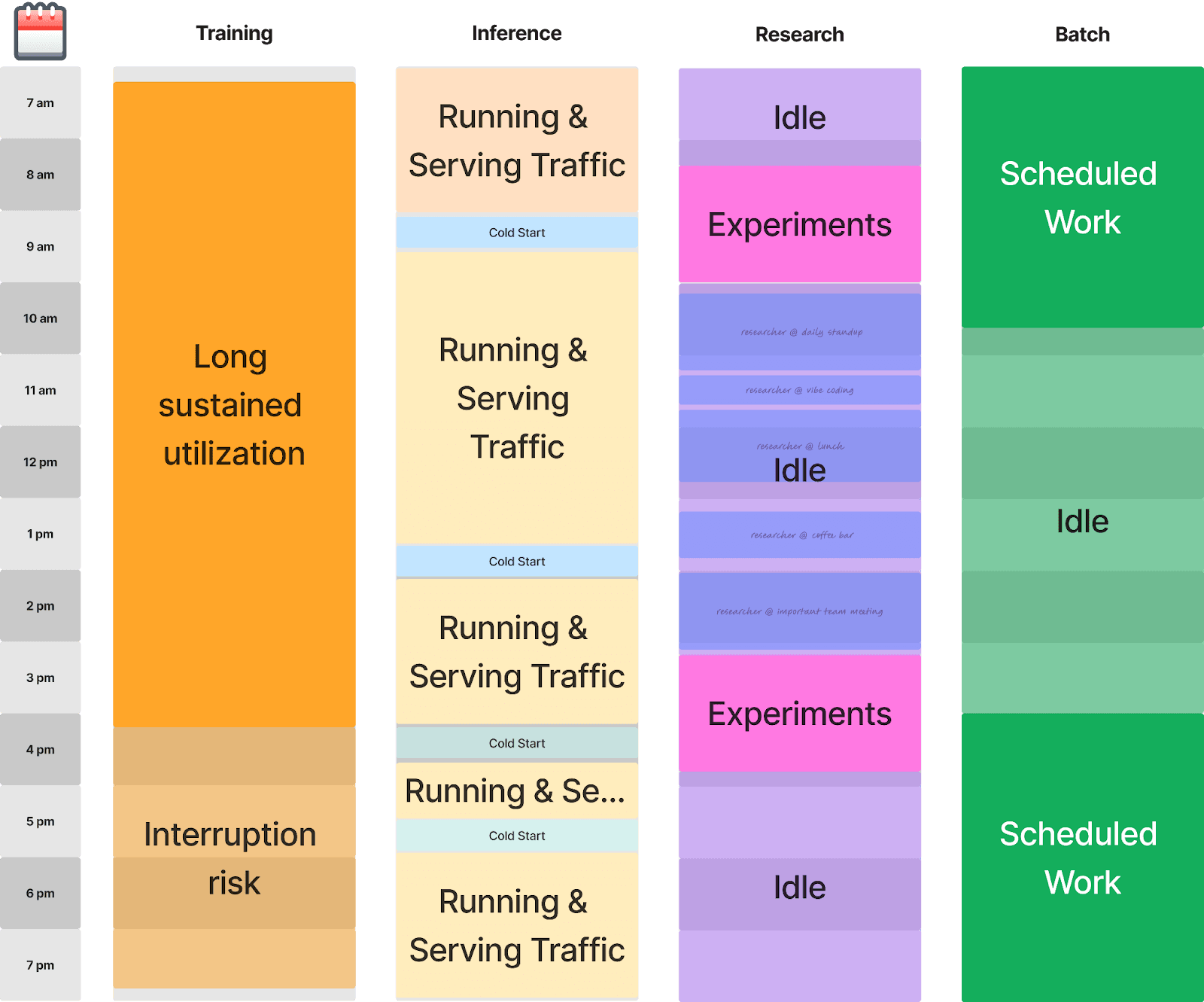
GPU utilization challenges stem from the diverse and often unpredictable nature of machine learning workloads. Unlike traditional applications with relatively consistent resource patterns, ML workloads exhibit dramatically different utilization characteristics that require workload-specific optimization strategies.
Training Workloads: The Interruption Cost Problem#
Training workloads represent the most resource-intensive and potentially wasteful category of GPU usage. These workloads typically run for hours or days, consuming substantial GPU memory and compute resources. However, they're particularly vulnerable to interruption costs that can multiply resource waste.
When a training job is interrupted without proper checkpointing, the entire computational investment is lost. A 12-hour training run that gets interrupted at hour 10 without checkpoints requires restarting from scratch, effectively wasting 10 hours of expensive GPU time. This creates a perverse incentive for teams to overprovision resources to minimize interruption risk, leading to systematic underutilization.
Checkpoint/Restore** technology** fundamentally changes this equation. By capturing the complete state of training processes—including GPU memory, model weights, and optimizer states—checkpointing enables training workloads to resume from interruption points rather than having to restart. This resilience allows organizations to utilize more cost-effective, interruption-prone instances (such as spot instances) while maintaining training reliability.
CRIU-GPU, an emerging technology that extends checkpoint/restore capabilities to GPU-accelerated workloads, represents a significant advancement in training efficiency. By capturing GPU state alongside CPU state, CRIU-GPU enables seamless migration of training workloads between nodes, more aggressive use of spot instances, and faster recovery from failures.
Real-Time Inference: The Cold Start Challenge#
Real-time inference workloads, typically deployed as Kubernetes Deployments, face different optimization challenges centered around responsiveness and resource efficiency. These workloads must maintain low latency while efficiently utilizing expensive GPU resources.
The primary efficiency killer in inference workloads is the cold start problem. When inference pods restart or scale up, they must reload large models into GPU memory. This process can take 30 seconds to several minutes for large language models or computer vision models. During this loading period, the GPU is partially utilized while the system prepares for inference requests.
Consider a scenario where you're running an 80GB language model on an H100 with 141GB of GPU memory. While the model fits comfortably in memory, the loading process creates a significant gap in utilization. If pods restart frequently due to deployment updates or node maintenance, these cold starts accumulate substantial waste.
Strategic right-sizing becomes critical for inference workloads. Rather than defaulting to the largest available GPU instance, teams should match GPU memory requirements to model sizes while considering replica strategies that minimize cold start frequency.
CRIUgpu (generally, checkpointing GPU workloads) is used to serialize the contents loaded in GPU memory (instead of having to redownload the weights, etc on restart) is critical to help reduce cold start times on pod restart.
Batch Inference: Throughput vs. Utilization Trade-offs#
Batch inference workloads process large volumes of data asynchronously, typically using Kubernetes Jobs or CronJobs. These workloads offer the most significant opportunity for optimization because they can tolerate higher latency in exchange for better resource efficiency.
The key optimization principle for batch inference is utilization density—maximizing the amount of useful work performed per GPU-hour. This often involves batching strategies that fully utilize GPU memory and compute capabilities, even if individual request latency increases.
Research Workflows: The Utilization Killers#
Research and experimentation workflows represent the most challenging category for GPU utilization optimization. These workloads, often running in Jupyter notebooks or interactive development environments, exhibit highly irregular usage patterns with long idle periods.
A typical research workflow might involve:
- Loading a large dataset into GPU memory
- Running short experiments with high GPU utilization
- Long periods of analysis and code modification with zero GPU usage
- Abandoned experiments that continue consuming resources
Research workflows often receive priority access to GPU resources due to their exploratory nature; however, this priority frequently results in poor utilization. A data scientist might reserve an H100 instance for a week-long research project but only actively use the GPU for 10-15% of that time.
Addressing this systematic waste requires more than manual monitoring. A dedicated GPU optimization platform can automatically identify idle GPU workloads, enforce usage policies, and reclaim unused resources, without disrupting active training or inference jobs.
**Join this upcoming workshop with NVIDIA to learn more about GPU utilization for Kubernetes. **Register here.
Frequently Asked Questions#
What causes GPU clusters to run at 15-25% utilization?#
GPU underutilization stems from misaligned workload scheduling, overprovisioning for peak demand, and lack of dynamic reallocation. Training jobs often reserve GPUs during overnight research periods but only actively use them 10-15% of the time. Inference workloads spike unpredictably, forcing engineers to provision for peak capacity that sits idle during off-peak hours. Without workload-aware scheduling and resource rightsizing (GPU memory allocation, bin packing, and checkpoint/restore capabilities), clusters default to conservative over-provisioning, leaving significant GPU capacity unused.
Why is 60-70% idle time in GPU clusters so costly?#
GPU expenses are 10-50x higher than CPU compute on a per-hour basis. A single NVIDIA H100 costs $30-50/hour; an underutilized cluster with 20 GPUs at 20% utilization burns approximately $200,000 annually in wasted compute costs alone. Unlike CPU overprovisioning (which wastes thousands monthly), GPU waste directly translates to six-figure annual budget bleed. This makes GPU utilization optimization not a technical convenience but a business-critical priority. Even small improvements in utilization directly reduce infrastructure spend by tens of thousands monthly.
How do I accurately measure GPU utilization in Kubernetes?#
Standard Kubernetes metrics (GPU memory requested vs. allocated) don't capture actual usage patterns. True GPU utilization requires monitoring GPU memory actively in use (not just allocated), GPU core utilization percentages, and workload-specific metrics like training iteration time or inference throughput. Tools like NVIDIA DCGM, Prometheus with GPU exporters, and platform-native monitoring (vLLM metrics for inference, PyTorch profilers for training) reveal the gap between provisioned and actual consumption. Start by instrumenting your most expensive workloads (training and inference) to establish baselines for optimization.
What are the top tools for reducing Kubernetes GPU costs in 2026?#
The space includes DevZero, Run:ai, Volcano, and NVIDIA GPU Operator. DevZero combines GPU and CPU optimization in one platform: NVIDIA MIG partitioning (up to 7 instances per A100), checkpoint/restore for spot-instance GPU training (saving up to 70% versus on-demand), GPU-aware bin packing, and ML-based forecasting to pre-scale before demand spikes. DevZero customers typically reduce GPU cloud spend by 40-60% within 30 days.
Can I fix GPU idle time without migrating my workloads?#
Yes. GPU optimization platforms like DevZero use live GPU memory rightsizing with CRIU checkpoint/restore, allowing you to adjust allocations and reschedule workloads without pod restarts or data loss. Existing training, inference, and research workloads can be optimized in-place. GPU-aware bin packing and scheduling policies can also be deployed on top of your current infrastructure without modifying application code. The main thing to verify is that your platform supports your workload mix — batch training, long-running inference, and interactive research each impose different requirements on the scheduler.

Debo Ray
Co-Founder, CEO


